Using Instagram images: permission before downloading
A downloadable image is not automatically yours to republish. Start with the creator and the intended use.
A downloadable image is not automatically yours to republish. Start with the creator and the intended use.
Identify the rights holder
Find the original creator or organization and check whether a license, embed option or direct permission covers your use. A profile picture can identify a person as well as belong to a creator. A third-party download site cannot grant rights it does not own. Keep a record of the permission and any limits on channel, duration or modification.
Ask for a usable original
If permission is granted, request the original file or an approved export. This is often clearer and higher quality than scraping a compressed copy. Confirm the desired attribution and whether the person needs to approve the crop or caption. For a testimonial or identifiable image, check the organization’s privacy and consent process too.
Publish and maintain the record
Attach the credit and usage note to the asset in your workflow. Check that captions, alt text and context do not change the meaning. If permission is withdrawn or the post is removed, know who can update your publication. Prefer linking to a creator’s own work when republishing adds little value.
Make the next move clear
Use this sequence as a starting point, then adapt it to your audience and account.

A small magazine wants to feature an artist’s Instagram photograph. It asks for permission to use the image in a named article, receives the original file and preferred credit, and saves the email with the editorial asset.
This is an new workflow, not legal advice; rights and privacy obligations depend on the use and jurisdiction.
Verify the current platform.
Product features can change by account, country and time. Check the official source and the current app before acting.
Show what you made, and keep the source permission separate
A post can contain your own explanation and someone else’s photograph. Recording only “original post” hides that distinction. Keep an asset record that separates source material, permission, your contribution and the credit published with it. This is an new workflow, not a determination of copyright or a substitute for the permission required for your particular use.
Keep four decisions visible
Name the source and the actual creator. Save the permission or licence terms for the intended channel, edits and duration. Describe your own contribution without claiming ownership of the source. Finally, write the visible credit and identify who can correct the post if the terms change. If any permission is unresolved, keep the asset out of the planned publication.
Do not store private correspondence in a public spreadsheet. The published credit and the private evidence record have different audiences. A permission record can point to a controlled team folder; readers only need the appropriate public attribution and context. Accessible text should explain the image’s purpose, rather than merely repeating a credit.
Two fictional attribution examples
Example A: a magazine receives a photographer’s approved image for one named Instagram post, with cropping allowed and the credit “Photo: Example Photographer”. The magazine contributes a three-point explanation of the pictured process. Its private record lists that limited permission, the crop, the editor and the expiry review. Its caption says “Three observations by Example Magazine. Photo: Example Photographer, used with permission.” The magazine does not call the photograph its own.
Example B: a maker uses only photographs they took and draws their own comparison arrows. Its record states who took the pictures and created the annotations, with no third-party source image. A caption might say “Photographs and annotations: Example Studio.” This is not proof that every visible logo, identifiable person or location has been cleared; record any remaining questions separately. Both examples and names are invented.
Review before export
- Match each exported asset to its source record.
- Compare the intended edit and channel with the actual permission.
- Describe the original explanation, annotation or demonstration precisely.
- Read the credit in the final crop and caption.
- Check that alternative text explains the useful visual information.
- Record who will respond to a correction request and where the source evidence is kept.
W3C guidance explains how text alternatives depend on an image’s purpose. It does not grant reuse rights. If a licence or creator’s message is unclear, resolve that question before publishing, rather than relying on a download button or a generic attribution line.
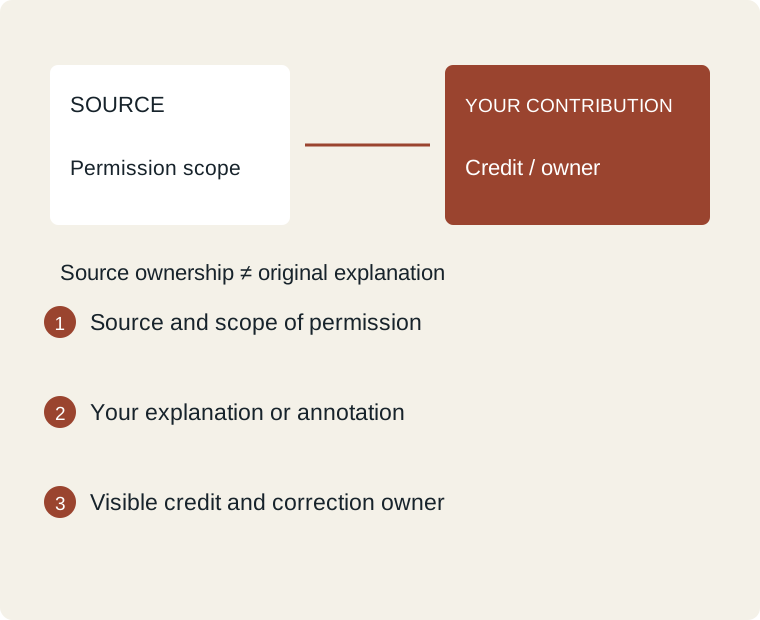
Steps: Source and scope of permission → Your explanation or annotation → Visible credit and correction owner
| Field | Completed example |
|---|---|
| Source and creator | Fictional Example Photographer |
| Permission / unresolved questions | Permission for one named post |
| Channel and allowed edit | Instagram post; crop allowed |
| Your original contribution | Magazine’s three-point explanation |
| Published credit / alt purpose | Photo credit plus useful visual description |
| Private evidence / correction owner | Controlled folder; named magazine editor |
Blank worksheet and worked example ↓
Primary context: W3C WAI: text alternatives depend on image purpose
Trace one image through its exported versions
A permission record can be correct for one image while a later export falls outside its recorded scope. Add a small derivative log. This is a fictional new workflow, not a legal conclusion about a particular licence or jurisdiction.
- Give the source asset an internal identifier and point to the controlled permission record. Keep private correspondence out of the public credit.
- List each crop, caption, channel and planned publication separately. Compare those uses with the actual terms; do not treat an earlier approval as permission for every derivative.
- If a question or correction arrives, identify the affected exports and pause any unresolved new use. The responsible editor checks the terms before deciding what must change.
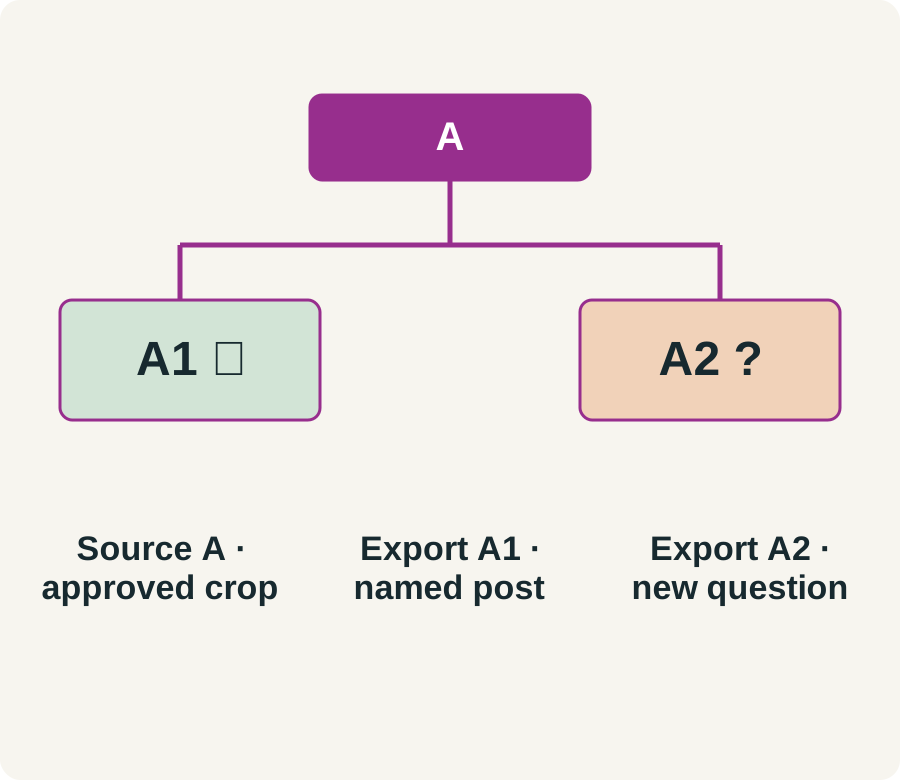
Worked example: source A is approved for one cropped photograph in a named Instagram post. Export A1 matches that use and retains the credit. Export A2 adds the image to an email banner; the record contains no approval for that channel. A1's recorded scope does not answer A2's question. Mark A2 pending rather than changing the old record to say 'all marketing'.
Log: source ID __; export ID __; edit/channel __; permission evidence __; public credit __; unresolved question __; correction owner __. WIPO explains the distinction between access to a work and permission to use it; the export log makes that distinction reviewable in your own workflow.
Source: www.wipo.int.